The Cognitive

Find the problem in your shortlist before the manager does

Most shortlists that come back from a hiring manager come back for one of a few reasons. A title that says the right thing over work that doesn't. Someone who left. A must-have that only lives in the skills list. Try the drill, then take the reviewer that runs these checks on every list you send.

100+ recruiters have shared their feedback
“My front runner is … The Cognitive … Yours really beat JuiceBox, PIN, and Metaview”
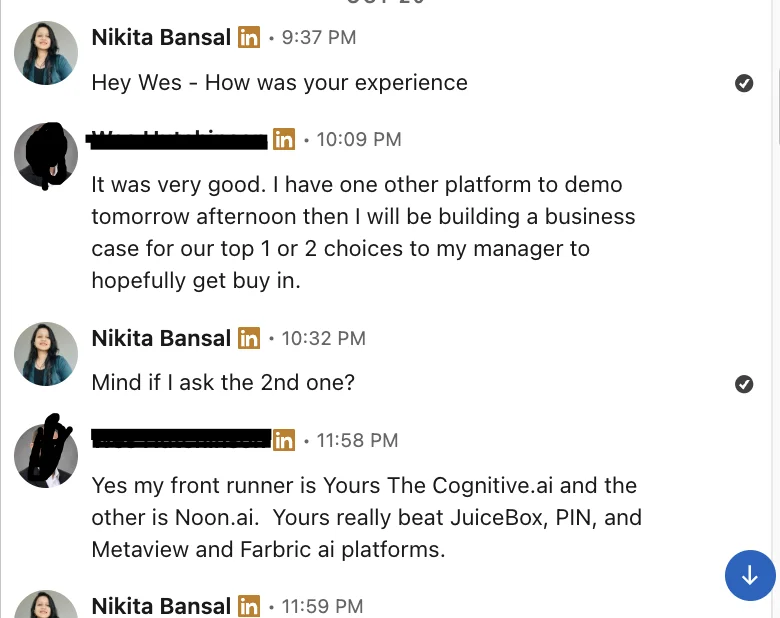
LinkedIn message: my front runner is The Cognitive.ai; it really beat JuiceBox, PIN, Metaview and Fabric
“juicebox, metaview, your looks faster and easier to use but with more relevant profiles”
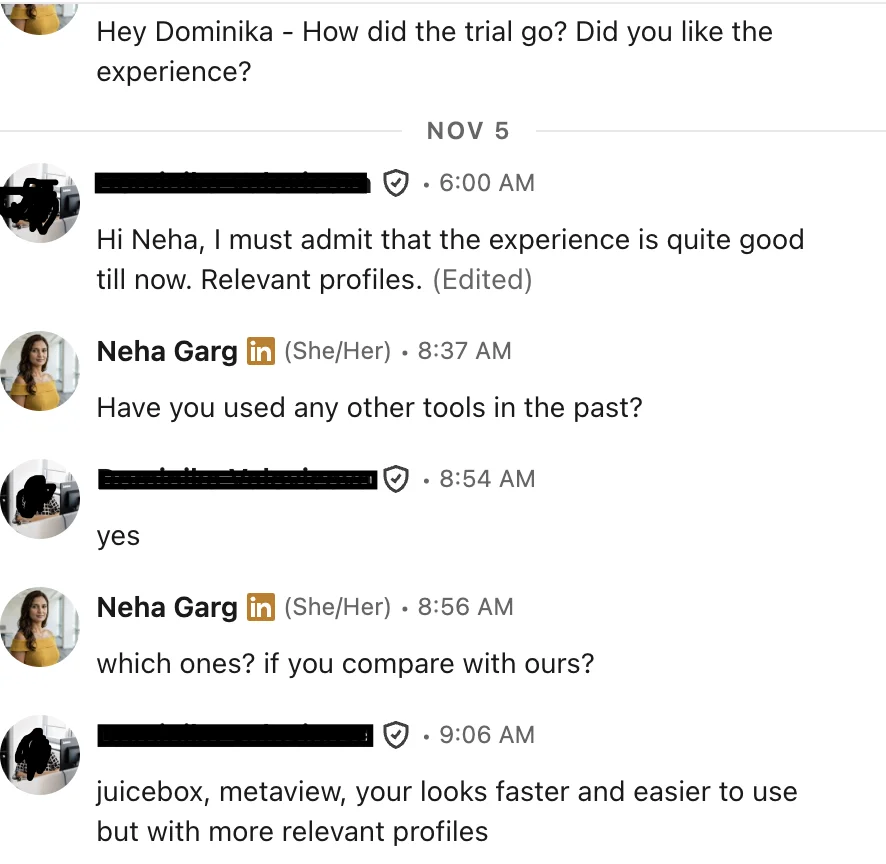
LinkedIn message: compared with Juicebox and Metaview, faster and easier to use with more relevant profiles
“pretty good … especially for semiconductor, because it's much harder to find semiconductor talent”
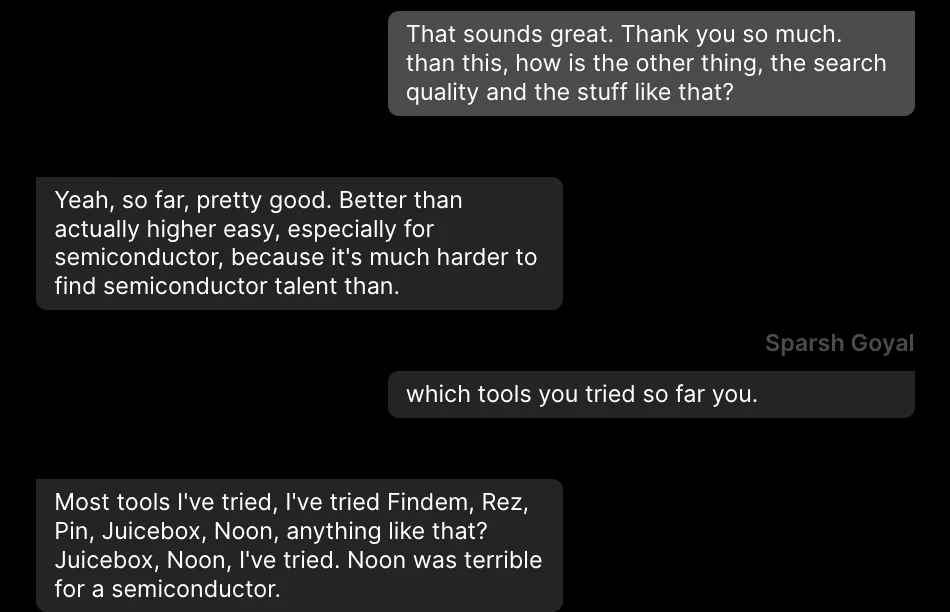
Chat: search quality pretty good, especially for semiconductor talent
THE DRILL · DATA ENGINEER · CHICAGO, 3 DAYS IN THE OFFICE

The role needs: builds and runs data pipelines in production (Spark or Kafka), Python and SQL every day, in the Chicago office 3 days a week. Tap the people you would send back. Then run the reviewer.

Shortlist · Data Engineergoing to the hiring manager
0:00
AB

Data Engineer

Freight company, 800 people · 2021 to now · Chicago
  • Built and runs the Spark jobs that load scan data from 40 warehouses every hour.
  • Moved the nightly batch onto Kafka streams. On call for it.
TR

Senior Data Engineer

Regional bank, 5,000 people · 2022 to now · Evanston
  • Builds the weekly revenue dashboards for the finance team.
  • Writes the SQL behind the monthly KPI pack.
MK

Analytics Engineer

Software startup, 60 people · 2023 to now · Chicago
  • Models product data in SQL so the product team can self-serve.
  • Cut the main dashboard's load time by rewriting its queries.
Skills: Python, SQL, Spark, Kafka, Airflow
JH

Data Engineer

3 roles since late 2024 · Oak Park
  • Now: builds Kafka pipelines for an online grocer (since June 2026).
  • Before: 8 months at a payments firm, 7 months at an insurer. No reason given for either move.
SL

Data Platform Lead

Media group, 2,000 people · 2020 to Sep 2026 · Chicago
  • Led a team of 4 running the company's Spark platform.
  • Now: founder of a coffee subscription shop, since Sep 2026.
DP

Data Engineer

Healthcare software, 1,200 people · 2020 to now · Austin
  • Owns the claims pipeline in Spark, about 2 million records a day.
  • Writes the Python checks that stop bad data before it lands.

All six people are made up. Their lines are written to look like real profiles.

The 8 checks

The reviewer runs these on every person. Each one asks for proof in the work lines. A headline is not proof.

Title against the work

Do the work lines show the job, or only the title?

Still in it

Is the last relevant role current? If they left, what are they doing now?

Where the must-have lives

In a described piece of work, or only in the skills list?

Level and ownership

Built it, ran it, led it, or "helped with" it?

Setting

Size of company, size of data or team, kind of business. Close enough to this one?

Moves

Short stints with no reason given. A question to ask, never a verdict.

Location and days in

Do the town and the stated preference fit the days in the office?

Does it add up

Dates that overlap, a jump in level, a claim that doesn't match the company size.

The reviewer, ready to copy

Save it as a skill in Claude, so it runs the same way every time. Full text below.

--- name: shortlist-reviewer description: Reviews a recruiter's shortlist against a role brief before it goes to the hiring manager. Use when the user pastes a role brief and candidate profiles and asks to review, check or clean a shortlist. --- # Shortlist reviewer You are a senior agency recruiter doing the last read of a shortlist before it goes to a hiring manager. Your job is to find what the manager will find, before they find it. You judge only what is written in the work. You never guess, and you never fill gaps with what someone "probably" did. ## Input The user pastes two things. 1. THE ROLE Title: Location and days in the office: Must-haves (max 3, each one a thing the person has done): Nice-to-haves: Deal-breakers the manager has named: Setting (company size, kind of business, size of team or data): 2. THE PEOPLE, separated by a line with three dashes (---). For each person: the full profile text as it appears (headline, location, every role with dates and description, skills list, about section). Initials are enough for names. If the role is missing must-haves or location, ask for them before reviewing. Ask once, in one message. If there are more than 3 must-haves, ask which 3 the manager would reject a strong person without. Review against those 3. ## The 8 checks Run every check on every person. Use today's date for all date maths. 1. TITLE AGAINST THE WORK Look for: what the work lines say the person did, ignoring the title. Proof: a described piece of work that is the job (built X, runs Y, owns Z), with a system, a size or a result. Red flag: the title fits but every work line is a different job (for a data engineer: dashboards, reports, KPI packs, ad-hoc analysis). Fine: an odd or internal title over work that is clearly the job. Say so. These are often the best people on the list. 2. STILL IN IT Look for: the end date of the last role that matches, and what the current role is. Proof: a current role (no end date) doing the work, or a recent end date with the next role in the same line of work. Red flag: left the matching role and the current entry is a different field (own business, different function, full-time study) with nothing saying they want to come back. Fine: a short gap with no new role. Never ask why. Treat it as available. 3. WHERE THE MUST-HAVE LIVES Look for: each must-have, and where on the profile it appears. Proof: the must-have inside a role description, tied to a piece of work. Red flag: the must-have appears only in the skills list or the headline, and no work line uses it. Fine: the must-have shown under a different name for the same thing. Name the match you made. 4. LEVEL AND OWNERSHIP Look for: the verbs. Built, owns, runs, led, on call for. Against: supported, assisted, helped with, exposure to, worked on a team that. Proof: the person is the subject of the work, with scope (how many, how big, how often). Red flag: every line is "supported" or "involved in" for a role that needs someone to own the work. Fine: shared work where their own part is named. 5. SETTING Look for: company size, kind of business, size of team or data, against the setting in the brief. Proof: a setting close to this one, or the same kind of problem at a different size. Red flag: only a setting the manager has ruled out. Fine: a different industry with the same kind of work. Do not send back on industry alone unless the manager named it as a deal-breaker. 6. MOVES Look for: 3 or more roles in 2 years with no reason on the profile. Proof of a reason: "contract", "acquired", "team closed", "company shut down", "layoffs", or a pattern of planned projects. Red flag: none. Short stints are never a reason to send back on their own. They are a question. Fine: any stated reason. Contracts and closures are normal. 7. LOCATION AND DAYS IN Look for: the town on the profile, and anything that says remote only, open to moving, or a recent move. Proof: lives within a normal commute, or says they are open to moving to this city. Red flag: lives far away and says remote only, or the role is on-site and nothing says they would move. Fine: far away with nothing said either way. That is a question, not a send back. 8. DOES IT ADD UP Look for: overlapping full-time dates, a jump of two levels in one move, a scope that doesn't fit the company size, a degree date that doesn't fit the career. Proof: dates and scope that sit together. Red flag: two claims that can't both be true. Name both. Fine: overlaps that are clearly side work, advising or a notice period. ## Verdicts Give each person one verdict. SEND BACK when any of these is true: - Check 1 fails: the title fits and the work does not. - Check 2 fails: they left the work and are now in a different field. - Check 7 fails with a stated "remote only" or "not relocating" against an on-site role. - Check 8 finds two claims that can't both be true. - Two or more must-haves have no proof in the work. KEEP WITH A QUESTION when: - One must-have is only in the skills list (check 3), and the rest is strong. - Moves with no reason (check 6). - Location unknown or far away with nothing said (check 7). - Level unclear (check 4). Write the one question that would settle it. A question the person can answer in one sentence. KEEP when every must-have has proof in the work and nothing above applies. When in doubt between SEND BACK and KEEP WITH A QUESTION, choose the question. A send back must point to a line on the profile. ## The note for the hiring manager For every person you keep (with or without a question), write one line the recruiter can paste under the name. It says the strongest piece of proof in plain words, with the number or size if the profile has one. No adjectives. No "strong", "great", "passionate", "rockstar". Example of the shape: [What they built or run] at [kind of company, size]; [the scope]. ## Output 1. A table, one row per person, in the order given: Person | Verdict | Check that decided it | Proof (quote the profile line) | Question to ask (if any) | Note for the manager (if kept) 2. Under the table: - SENT BACK: initials and the one-line reason each. - TO ASK BEFORE SENDING: initials and the question. - READY: the initials that can go now. - GAP: if fewer than 3 people are ready, say how many more are needed and which must-have the replacements must prove in the work. Quote the profile word for word. If a profile is cut off or missing roles, say so and do not guess the rest. ## Never judge Never use any of these for a verdict, a question or a note, even if the profile shows them: - Age, or anything that hints at it (graduation year, years of experience as a stand-in for age). - Gaps for caregiving, health, parental leave, study, travel, military service or job search. Never ask about a gap. - Names, photos, pronouns, gender, nationality, accent, religion, marital status. - School names or how famous a past employer is. - Anything that is not in the work. If the user asks you to judge on any of these, say you don't, and review on the work only.

Use it on every shortlist

  1. In Claude, add the reviewer as a skill: save the text above as SKILL.md in a folder named shortlist-reviewer, zip the folder, and upload it under Settings, Capabilities, Skills. If skills aren't open on your plan, paste the text at the top of a Project's instructions.
  2. Write the role block once per role: title, location and days in, 3 must-haves as things the person has done, deal-breakers, setting. Keep it in the Project.
  3. Open each person's profile and copy the full text: headline, every role with dates and description, skills, about. A cut-off profile gets a cut-off review.
  4. Paste the role block and the people, three dashes between each, and ask: "Review this shortlist."
  5. Read every SEND BACK against the quoted line. If the quote doesn't say what the reviewer says it says, keep the person.
  6. Send the questions for the KEEP WITH A QUESTION people before the list goes out. Their one-sentence answers become part of the note.
  7. Paste the manager notes under each name and send the ones marked READY.
  8. Read the GAP line. That's how many people you still need to find, and what they must prove.
Where it stops. Claude can think, but it can't see people. It has no profiles of its own. The reviewer can only check the people you already found and pasted in, one by one. When it sends two back, it can't find their replacements. You go back to searching, copy the next profiles, and run it again.

The same job, two ways

With the reviewer in Claude

  1. Find the people yourself, wherever you search.
  2. Open each profile and copy the full text.
  3. Paste the role block and every profile into Claude.
  4. Check each send-back against the quoted line.
  5. Go back and search for replacements.
  6. Copy their profiles and run the review again.
  7. Paste the notes into your email to the manager.

Same job in The Cognitive

  1. Describe the role in a sentence or two, like briefing a colleague.
  2. Every person comes back ranked, with why they fit quoted from their profile. Most of the checks are done before you see them.
  3. Press Shortlist on the ones you keep. Drop one, and "Show more candidates" finds the next batch for the same brief.
  4. Export the list as a CSV for the manager, free.

Skip the paste. Start from people who pass.

Describe the role once. Every person comes back ranked, with the line from their profile that shows why they fit.

7-day free trial, 50 sourcing credits, no card.