AI Tools for Talent Acquisition: What's Worth Adopting
Published
Adopt AI for a repeated recruiting bottleneck, not for a long feature list. The Cognitive sources, interviews, and shortlists in one pipeline with evidence behind each score
AI tools for talent acquisition are worth buying when they fix a measured bottleneck. Compare scheduling, sourcing, interviews.

AI tools for talent acquisition are worth adopting when they solve a visible, repeated bottleneck and produce an output a recruiter can check. The best first use is often scheduling, sourcing, or follow-up. High-consequence candidate decisions need a clear rubric, evidence, and human review.
I still remember a Tuesday afternoon when a talent acquisition team at a mid-sized engineering company was moving 6 interview panels around a shared calendar. A half-eaten sandwich sat beside the laptop. The calendar was so crowded that the recruiter kept a handwritten list of interviewers because the screen had become too cluttered to trust.
That afternoon, the team discussed whether to adopt an AI recruiting platform. Some people wanted automated candidate screening because it sounded faster. The recruiters had a different complaint. They were losing hours to scheduling delays, missed follow-ups, and candidates waiting for a reply.
Key takeaways
- AI tools for talent acquisition should start with a named bottleneck, such as interview scheduling delays or a large sourcing workload.
- Automation is easier to trust when the result is visible and measurable, such as fewer coordination emails or a shorter time to first interview.
- Candidate evaluation needs human review, a fixed rubric, and evidence tied to what the person actually said or did.
- The Cognitive sources, interviews, and shortlists in one pipeline, with live two-way interviews and evidence-backed scorecards.
- Feature count is a poor buying test. A narrower tool that removes repeated work can be more useful than a broad platform nobody has defined a job for.
What do AI tools for talent acquisition do in practice?
AI tools for talent acquisition either help people move candidates through a process or help teams evaluate evidence about candidates. The first category usually carries lower risk because the result is easy to observe. The second can affect who gets considered, so it needs stronger controls.
The Tuesday discussion became clearer once the team separated workflow assistance from delegated judgment. A calendar tool could show whether a meeting was booked. An evaluation model could influence whether a person ever reached a hiring manager, and that decision was harder to audit after the fact.
| Use case | What AI does | What you can measure | Human oversight |
|---|---|---|---|
| Interview scheduling | Offers slots, sends reminders, handles reschedules | Time to book, coordination emails, completion rate | Review exceptions and candidate complaints |
| Candidate sourcing | Finds people from a talent database and supports outreach | Qualified replies, reveal success, source-to-interview rate | Check search criteria and outreach quality |
| Candidate evaluation | Runs interviews or organizes answers against a rubric | Completion, score consistency, evidence quality, time saved | Review evidence and make the hiring decision |
| Candidate communication | Sends reminders, status updates, and reply triage | Response time, missed replies, candidate drop-off | Handle sensitive or unusual messages |
| Pipeline reporting | Surfaces stage delays and trends | Time-to-hire, pass rates, stage conversion | Interpret causes before changing policy |
Scheduling was the obvious starting point for that engineering team. The delay was visible in the calendar. The cost was visible in recruiter time. The fix could be tested without handing a model the authority to reject people.
That distinction is easy to lose under pressure. A vendor demo may show sourcing, interview automation, scorecards, outreach, analytics, and scheduling in a single afternoon. Those features may all be useful. They do not all solve the same problem.
If you cannot name the repeated task, the current cost, and the output you will inspect, you are not ready to automate it.
Where does AI create the clearest recruiting gain?
AI creates the clearest gain where work is repeated, rules are understandable, and failure is easy to spot. Interview scheduling is a good example because every booked meeting has a simple result: the right people received the right invitation at the right time.
Sourcing can also be a strong use case when the search criteria are specific. Plain-English search across a large pool is more useful than asking a recruiter to build a long Boolean string for every role. The recruiter still needs to check whether the results match the role, especially when seniority, location, or industry requirements are subtle.
Candidate evaluation is different. A model that produces a number without a quote, timestamp, transcript, or recording asks you to trust an invisible judgment. That is a weak foundation for a hiring decision.
The practical rule is simple: automate the movement of candidates first, then test automation that organizes evidence, and only expand after you know what the output means.

How should you get started with AI tools for talent acquisition?
Start with a 1-role experiment that documents the bottleneck, sets a baseline, defines human review, and names both success and failure before the tool is turned on. A small test gives you evidence without forcing the whole recruiting team to change at once.
1. Write down the problem without naming a tool
Do not begin with “we need AI.” Begin with an ordinary description of the work. For example:
- Recruiters spend 6 hours each week moving interview panels.
- Candidates wait 3 business days for a first reply.
- Hiring managers receive too many applications to review carefully.
- Interview feedback arrives late and is based on different standards.
- Passive candidates reply, but nobody follows up within 24 hours.
Each statement points to a different purchase. A scheduling tool may help the first problem. Candidate sourcing software may help the second or fifth. A structured interview platform may help the fourth. An AI resume reader may appear to help the third, but it can also reproduce the weaknesses of keyword matching.
In the Tuesday example, the team had been talking about the third problem because “too many applicants” sounded strategic. The actual pain was the first one. Naming it changed the meeting.
2. Set a baseline you can check in 30 days
A baseline does not need a perfect analytics setup. Count the work for 1 role over 2 weeks. Record how many coordination emails are sent, how long it takes to confirm a panel, how many candidates wait for a reply, and how many interviews are rescheduled.
For candidate evaluation, track different measures. Record the time hiring managers spend in interviews, the percentage of completed interviews, how often interviewers disagree on a score, and whether each decision has evidence attached. The recruitment analytics metrics that matter are the ones that show where candidates stop moving, not just how many applications entered the ATS.
Use a before-and-after comparison. “The team likes the tool” is useful feedback, but it is not a result. “Panel confirmation fell from 18 emails to 6 per role” is a result you can act on.
3. Set the human boundary before the test
Write down what the tool may do without approval and what requires a person. A scheduling system can suggest times, send reminders, and offer a reschedule link. A recruiter should handle an accessibility request, a complaint, or a sensitive personal question.
For candidate evaluation, the boundary should be stricter. AI can ask structured questions, organize transcripts, identify evidence against a rubric, and flag a result for review. People should inspect the evidence and make the final decision.
This matters because consistent automation is not the same as fair automation. A system can apply the same flawed rule to every candidate. Human review is not a magic safeguard, either, but it gives someone a chance to challenge an implausible result.
4. Test one workflow with a clear owner
Choose a single role, a single team, and a single person responsible for checking the outcome. Do not launch across every department while the process is still unclear.
The engineering team chose interview coordination. The recruiter opened a slot window, candidates selected their own times, and the team watched for missed invitations, time-zone mistakes, and reschedule requests. The experiment was deliberately boring. That was a good sign.
The Cognitive uses this candidate self-service model for its AI interviews. A recruiter sets the open and close dates, candidates choose a slot, and the join link and calendar invitation are sent automatically. It does not claim that scheduling disappears. The coordination work does.
When the evaluation question is the bottleneck, The Cognitive takes a different role. Its live AI interviewer appears with a realistic human face and human voice, asks role-specific questions, listens, responds, and pushes back on weak answers. Each next question is chosen live from the role, rubric, resume, and prior answers. The rubric and scoring standard stay fixed, while the conversation adapts.
5. Define failure before success
Success might mean a 30% reduction in coordination emails, a shorter time to book, or a 90% completion rate. Failure might mean candidates cannot find slots, hiring managers do not trust the output, or recruiters spend more time correcting the tool than doing the old task.
Set a stop condition. If a tool creates more exceptions than it removes after 1 month, pause it. If scorecards do not include evidence that a hiring manager can inspect, do not expand candidate evaluation based on the scores.
That is how a recruiting technology test stays a test. It does not become a permanent subscription simply because a team already spent time setting it up.
Which AI tools and options are worth considering?
The AI tools worth considering depend on the output you need. Scheduling tools produce confirmed meetings, sourcing tools produce reachable candidates, interview platforms produce evidence-backed evaluations, and communication tools produce faster follow-up.
The Cognitive is unusual in that its AI recruiting platform covers the full chain: it sources, interviews, and shortlists. Its sourcing product searches roughly 900M talent profiles in plain English, enriches contact details from 30+ sources, and provides verified personal emails and direct phone numbers when a reveal succeeds. Automated email and SMS sequences can follow, and sourced candidates can move into AI interviews in one pipeline.
| Tool category | Best first problem to solve | Output to inspect | Buying caution |
|---|---|---|---|
| Interview scheduling software | Calendar back-and-forth and slow confirmations | Booked slots, reschedules, missed invitations | Check time-zone handling and exception support |
| AI sourcing tools | Not enough qualified people in the active pipeline | Search relevance, contact accuracy, reply quality | Check the cost of returned candidates and successful reveals |
| Live AI interview platforms | Too many interviews for hiring managers to conduct | Recording, transcript, adaptive follow-ups, evidence-backed scorecard | Reject black-box scores and one-way recordings if depth matters |
| Candidate communication tools | Slow reminders and untriaged replies | Response time, opt-outs, interested replies, unresolved messages | Keep sensitive conversations with recruiters |
| Recruitment analytics tools | Unknown stage delays and candidate drop-off | Time-to-hire, completion, pass rates, source conversion | Do not confuse a dashboard with a fix |
Interview scheduling software
Scheduling is often the safest first automation because the intended outcome is concrete. A strong tool lets candidates choose from approved slots, sends the right calendar details, handles reminders, and makes rescheduling visible to the recruiter.
Ask for the exception path. What happens if the hiring manager changes availability? What happens if a candidate is in a different time zone? Can a recruiter see the original invitation and the latest change? A tool that handles the normal case but hides exceptions may create a new kind of manual work.
The Cognitive’s interview flow uses configurable slot windows and candidate self-scheduling. It also sends a confirmation, join link, and calendar invitation. This is a useful distinction for buyers: “no coordination” is an inflated claim. “Candidate self-scheduling with no coordination emails” is testable.
AI sourcing tools
AI sourcing tools are useful when your active applicants do not contain enough of the people you need. The best test is not how impressive the search box looks. Load the first 5 results, inspect them, and ask whether each person meets the actual bar.
Search results in The Cognitive load 5 candidates at a time and cost 1 credit per candidate returned, so a 5-candidate load costs 5 credits. Nothing is charged for results you never load. A successful personal email reveal costs 5 credits, and a direct phone reveal costs 10 credits. The product does not place calls. Recruiters can use a revealed number themselves.
Sourcing credits begin at $49 per month for 500 credits. Outreach Pro includes automated email and SMS sequences with AI reply triage. SMS is available with Pro Outreach, not lower tiers. Those details matter because a sourcing budget can look cheap until you understand what counts as usage.
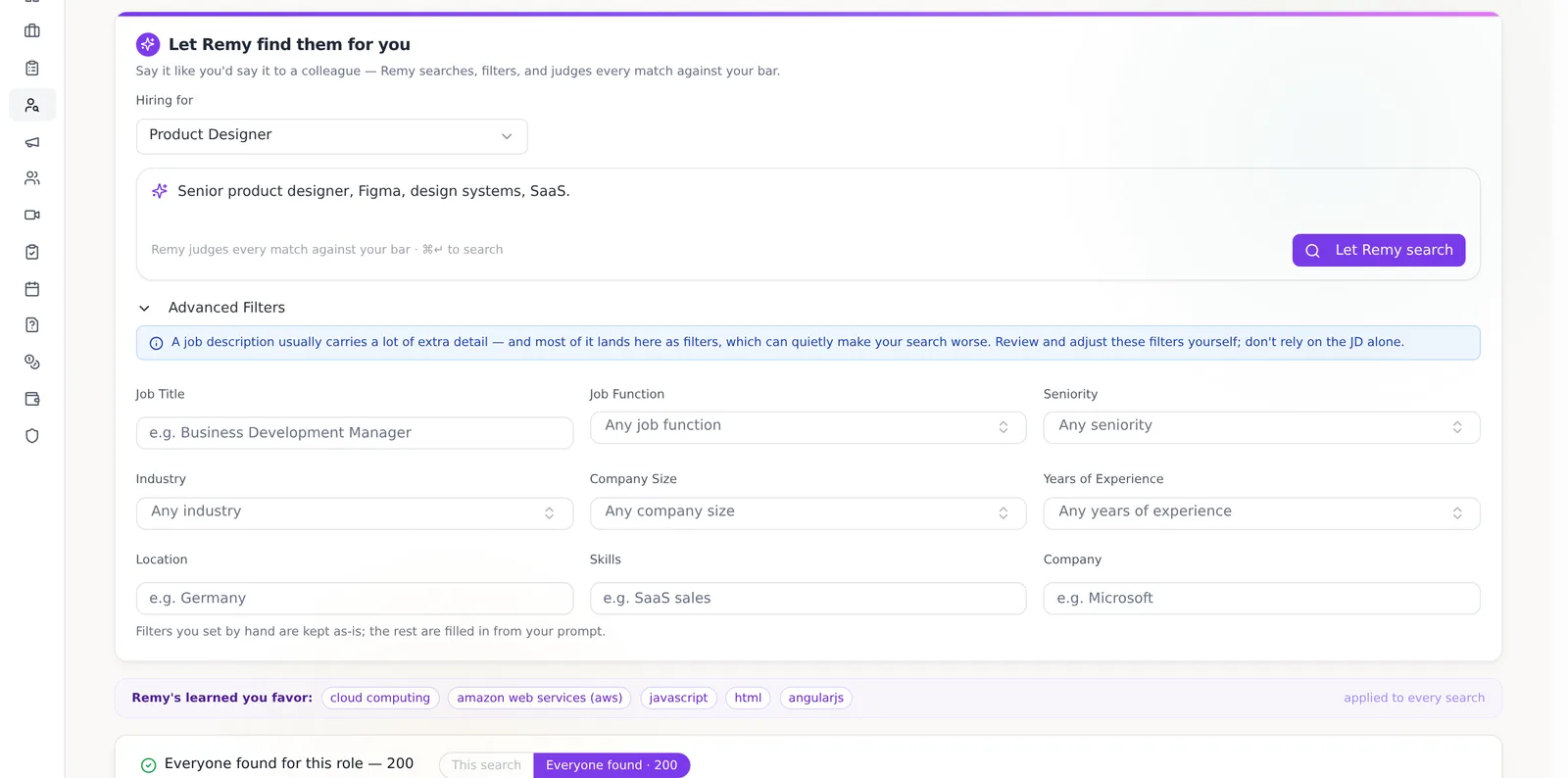
Use a Boolean search string generator if your main issue is writing repeatable search strings. Use an AI sourcing platform if your bigger issue is searching a large pool, revealing verified contact details, and following up at useful volume. The choice should follow the task.
Live AI interviews and candidate evaluation
A live AI interview platform is worth considering when human interviewers are the bottleneck and the role can be judged against clear criteria. The standard should be high. Look for a real two-way video conversation, a human voice and face, adaptive follow-ups, a full recording, a searchable transcript, and evidence tied to each score.
The Cognitive’s AI interviewer is built for that deeper interview. It can ask a backend engineer to walk through a database rollback, challenge a vague answer, and dig into the reasoning behind a proposed fix. It is not a scripted question tree or an async video form. The AI handles volume and organizes evidence. Humans decide who moves forward.
Each score should answer a simple question: what did the candidate say that earned this rating? The Cognitive's scorecards link criteria to exact quotes and short clips from the interview. A hiring manager can review “problem solving: 7/10,” open the supporting moment, and disagree if the evidence does not hold up.
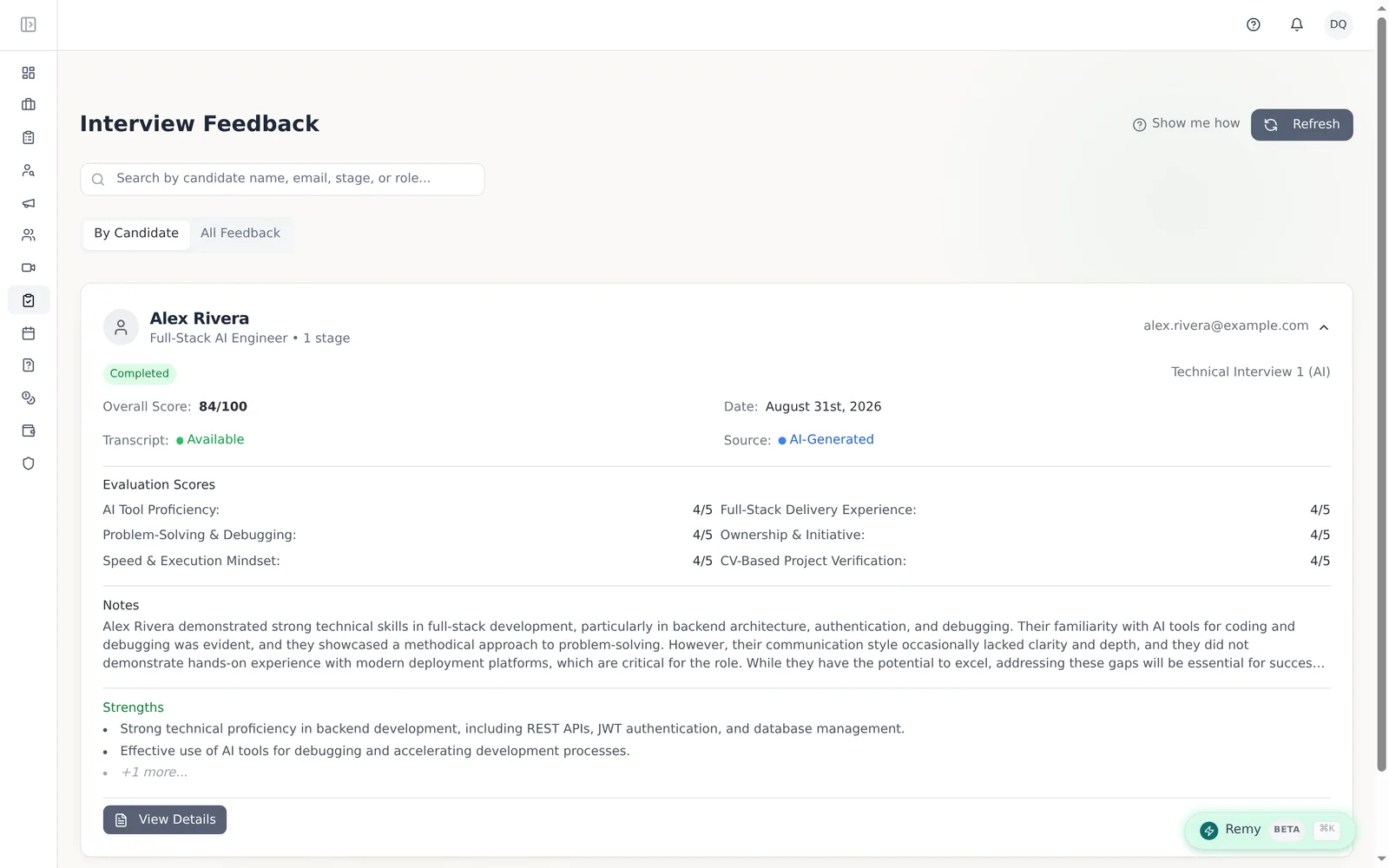
A structured interview rubric is the control layer. You can build one with the AI interview rubric generator, but a generated rubric still needs review from someone who understands the role. Strong criteria describe observable behavior. “Good communicator” is weak. “Explains a production incident in sequence, names the trade-off, and changes the plan when new evidence appears” gives an interviewer something to judge.
Candidate communication and follow-up
Automated communication is valuable when it keeps a promise you already made. Reminders, scheduling links, status updates, and simple reply triage can prevent good candidates from disappearing because nobody answered an email.
Do not let a communication bot handle every message. A candidate asking for an accommodation, challenging a decision, or sharing a serious concern deserves a person. Automation should reduce the queue, not make the recruiter invisible.
How should buyers compare tool categories?
Compare tools by the decision they improve, not by the number of features on the product page. A scheduler should be judged on booking delay. A sourcing tool should be judged on relevant contacts and replies. An interview platform should be judged on completion, evidence quality, and trusted shortlists.
For teams comparing broader options, the talent acquisition software buyer's guide is useful because it separates pipeline management from candidate evaluation. A traditional ATS still matters. The Cognitive sits on top of systems such as Greenhouse, Lever, and Workday rather than replacing the ATS or the recruiter.
Pricing should also match the use case. The Cognitive's AI interview plans start at $99 per month, while sourcing plans start at $49 per month. Interview credits and sourcing credits are separate balances. A team should not buy an interview plan to solve a sourcing problem, or a sourcing plan to fix a panel calendar.
What are the common mistakes when adopting AI tools for talent acquisition?
The most common mistake is buying a broad platform before identifying the work that needs fixing. Other failures follow from that first error: teams chase feature count, trust opaque outputs, skip measurement, and treat automation as a replacement for recruiter accountability.
Buying the promise instead of the bottleneck
“Automate talent acquisition” is too broad to be a buying requirement. It can mean finding passive candidates, writing job descriptions, coordinating panels, evaluating interviews, or reporting on pipeline health.
Ask a narrower question: what did the team do repeatedly last week that should not have required a person? The answer gives you a testable starting point.
Assuming more features means more value
A platform with sourcing, messaging, scheduling, analytics, and interviews may be useful. It may also give you 5 half-used features and a confusing process.
The engineering team nearly chose a broad screening feature because the company was under pressure to “do something with AI.” The feature sounded impressive, but nobody could agree on what the model should judge or how a recruiter would challenge its output. The scheduling tool had a smaller promise and a clearer result. That was the better first purchase.
Trusting a score you cannot inspect
Artificial intelligence scoring is only useful when the scoring standard is clear and the evidence is available. A score without a quote, transcript, recording, or defined criterion is a conclusion asking to be accepted on faith.
Ask vendors to show the complete path from candidate answer to score. Click the score. Read the evidence. Check whether a second reviewer would reach the same conclusion. If the demo only shows a colorful dashboard, keep asking.
Using resume data as a substitute for capability
Resumes are useful inputs, but they are claims. Keyword matching can reward familiar employers, schools, and polished language while missing people who can do the work but describe it differently.
For technical and high-skill roles, use resumes to form a search or interview context, then assess actual reasoning through work samples or a deep interview. The Cognitive's interviewer evaluates what a candidate can explain and solve in real time rather than treating resume language as proof.
Skipping the measurement plan
Teams often measure adoption because it is easy. They count logins, invitations, or completed searches. Those figures do not show whether hiring improved.
Measure the old cost against the new one. Did the time to schedule fall? Did candidates complete the interview? Did hiring managers spend fewer hours in low-signal conversations? Did the shortlist contain evidence they could use?
The Cognitive reports completion rates, pass rates, and time-to-hire. Across its interview data, completion has held above 90%, and the stated hiring target is a cycle of under 10 days instead of roughly 45 to 60. Those are useful claims only when you compare them with your own baseline.
Removing humans from consequential decisions
Recruiters should not be forced to rubber-stamp an AI result. Human review needs a real role in the process. That means someone can inspect the evidence, override a recommendation, record why, and decide whether the rubric itself needs changing.
This is also where compliance and candidate trust matter. Tell candidates when AI is involved. Keep records. Review results for patterns that suggest a group is being treated differently. The common AI hiring mistakes worth avoiding are often process mistakes, not model mistakes.
Adopting AI when the volume does not justify it
AI interviewing is not the right method for every role. If you hire 1 person a quarter, already know the candidate, and can give a thoughtful interview without delaying other work, a new platform may add more setup than value.
Automation earns its place when volume, delay, repetition, or inconsistency is causing visible harm. A small team should be more demanding about that threshold, not less.
How do you know whether an AI hiring tool is worth the cost?
An AI hiring tool is worth the cost when the measurable time or candidate loss it prevents is greater than its subscription and review cost. Compare the tool with the current expense of recruiter hours, engineer interview time, delayed offers, and candidates who leave the process.
A manual interview costs roughly $60 to $80 in engineer time. The Cognitive's AI interview plans start at $99 per month and are designed to replace wasted interview hours while leaving final decisions with people. That comparison is meaningful only if your team actually spends those hours and reviews the output carefully.
For scheduling, calculate the weekly cost of coordination. If 2 recruiters spend 3 hours each moving panels, that is 6 hours available for recovery. If the tool saves 1 hour but creates 2 hours of corrections, it failed even if the calendar looks modern.
For sourcing, calculate the cost of finding and reaching a qualified person. Include returned candidates, successful contact reveals, outreach replies, and recruiter review time. The Cognitive's sourcing credits refresh each billing cycle and unused credits do not roll over, so usage needs to match the team's hiring rhythm.
Can you test AI tools for talent acquisition before changing the whole process?
You can test AI tools for talent acquisition on 1 live role before changing the wider recruiting process. Use the same role, the same hiring manager, and the same baseline so the comparison is useful.
For The Cognitive, a trial includes 2 free AI interviews for 1 role and 100 sourcing credits. That gives a team enough room to experience the live interview, inspect a scorecard, and test whether plain-English sourcing produces relevant people before deciding whether the broader pipeline fits. You can test the process with a real role rather than relying on a feature tour.
Invite the people who will use the output to the test. A recruiter should inspect the sourcing and scheduling experience. A hiring manager should review the scorecard. Someone responsible for candidate experience should read the messages. Different users notice different failure modes.
FAQ: AI tools for talent acquisition
What are the best AI tools for talent acquisition to adopt first?
The best first tool is the one that fixes your most repeated and measurable bottleneck, often interview scheduling, candidate sourcing, or follow-up. Start with the category whose output is easiest to inspect and whose failure does the least harm.
Should AI screen candidates before a recruiter reviews them?
AI should not make an opaque early judgment that a recruiter cannot challenge. It can organize evidence, run a structured interview, and create a traceable shortlist, while a person reviews the criteria and makes the hiring decision.
How can a small recruiting team measure whether AI is working?
Compare a baseline with the same measures after 30 days: scheduling emails, time to book, candidate completion, recruiter hours, hiring manager hours, and time-to-hire. Adoption numbers alone are weak evidence because a team can use a tool often without improving the hiring process.
Does The Cognitive replace an ATS or a recruiter?
The Cognitive does not replace the ATS or the recruiter. It sits on top of the ATS and sources candidates, runs live two-way interviews, and produces evidence-scored shortlists so people spend less time on repeated coordination and low-signal interviews.
The useful result from that Tuesday was not a dramatic promise about AI. It was a smaller calendar, fewer avoidable emails, and a clearer understanding of what the team did not yet trust.
Choose AI for a visible, repeated recruiting bottleneck whose output can be checked. If the problem is scheduling, fix scheduling. If it is a thin pipeline, source better. If it is too many interviews, test a deep, evidence-backed interview and keep people in the decision.
Run the experiment on 1 real role. Count the work before and after. Then keep the tool only if the hiring day is genuinely better.
Frequently Asked Questions
What are the best AI tools for talent acquisition to adopt first?
The best first tool is the one that fixes your most repeated and measurable bottleneck, often interview scheduling, candidate sourcing, or follow-up. Start with the category whose output is easiest to inspect and whose failure does the least harm.
Should AI screen candidates before a recruiter reviews them?
AI should not make an opaque early judgment that a recruiter cannot challenge. It can organize evidence, run a structured interview, and create a traceable shortlist, while a person reviews the criteria and makes the hiring decision.
How can a small recruiting team measure whether AI is working?
Compare a baseline with the same measures after 30 days: scheduling emails, time to book, candidate completion, recruiter hours, hiring manager hours, and time-to-hire. Adoption numbers alone are weak evidence because a team can use a tool often without improving the hiring process.
Does The Cognitive replace an ATS or a recruiter?
The Cognitive does not replace the ATS or the recruiter. It sits on top of the ATS and sources candidates, runs live two-way interviews, and produces evidence-scored shortlists so people spend less time on repeated coordination and low-signal interviews.
Related reading
- Chief People Officer: What the Role Really Owns
- 10 Recruitment Automation Tools to Cut Admin Time
- Online Recruiting Software: Cloud vs On-Prem, Explained for Teams That Own the Mess
- Applicant Tracking System for Small Business: 4 Tool Types That Actually Fit
- One-Way Video Interview Software vs Live Video: Which Should You Use?
- AI Powered Recruitment Software: 8-Point 2026 Feature Checklist